Browsing by Genre and Chart: Finding Music You’d Never Search For
You open your music app, stare at the same five songs you have replayed for weeks, and close it again. That loop is not a taste problem — it is a search problem. When you only type in artists you already know, the algorithm keeps feeding you variations of the same sound. Genre and chart browsing breaks that cycle, and a free search platform like mp3juices.art makes it easy to wander into categories you would never have typed into a search bar.
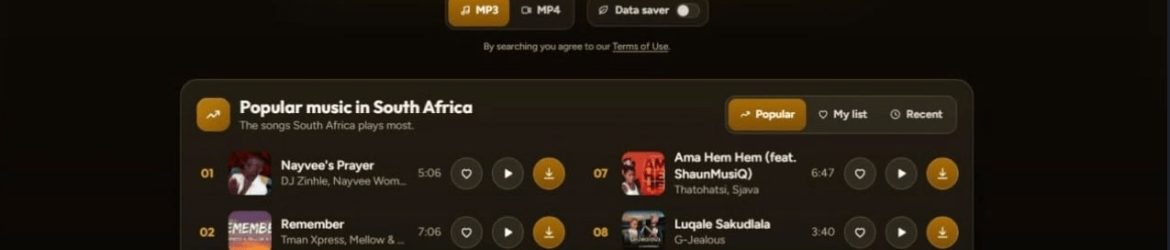
MP3Juices is a web-based music search and download tool. You can look up songs, preview them first, and save tracks as MP3 or MP4 files without creating an account or installing anything. The part most people overlook is the browsing layer: genre lists, artist pages, charts, and a personal list that turns casual clicking into a real discovery habit.
Why Genre Browsing Beats Typing Artist Names
Search rewards memory. Browsing rewards curiosity. If you already know what you want, a search box is faster. But when you are bored with your own library, the bottleneck is that you do not know what to look for — and that is exactly where category pages help.
A genre page gives you a shelf instead of a search field. You see adjacent styles, regional scenes, and subgenres that rarely surface in recommendations because they sit outside the mainstream listening graph. Browsing exposes you to music that no algorithm would have predicted for you, simply because you chose the door instead of waiting for a suggestion.
A practical genre tip
Pick one unfamiliar genre per week and preview five tracks before downloading anything. Use the listen-before-download option to sample quickly, then keep only the one or two that actually stick. This keeps your library intentional instead of bloated with half-heard files.
Go one level deeper than the label
Genres are not boxes; they are neighborhoods. If a broad category feels flat, look for the narrower styles inside it — the difference between a generic pop list and a synth-driven or acoustic subcategory is often where the interesting tracks live. Note the names of artists you liked and jump to their pages next.
Artist Pages, Charts, and the Personal List as Discovery Tools
Charts answer a different question than genres. Genre browsing asks “what style do I want?” while charts ask “what is moving right now?” Combining the two is how you find music that is both new to you and worth hearing.
Use charts as a starting point, not a destination
Open the charts, pick two or three tracks you have never heard, and preview them. Then follow the artist link from whichever track caught your ear. Charts are a doorway into an artist’s wider catalog, and that catalog is usually where the songs you would never have searched for are hiding.
Let artist pages do the cross-referencing
When you land on an artist page, treat it as a mini-discography. Preview older or less obvious tracks rather than only the current single. This is how listeners escape the “one hit on repeat” trap — the deeper cut is often the one that fits your taste better than the chart entry did.
Build a personal list as you go
The personal list feature is the quiet hero of discovery. Instead of downloading everything immediately, save candidates to your list, revisit them later, and only then commit to a download. A personal list turns browsing into a repeatable routine rather than a one-off scroll. It also gives you a record of what you were exploring, which makes it easier to branch out from there next time.
Format Choices, Data Saver Mode, and Common Mistakes
Discovery is only half the job. Once you find something worth keeping, the format and settings you choose decide how usable that file will be on your devices.
- MP3 is the practical default for audio-only listening: small files, broad device support, and quick transfers to phones or car players.
- MP4 matters when the visual is part of the experience — performance clips, lyric videos, or anything where the picture adds meaning.
- Data saver mode is useful on limited connections: it reduces how much data the site uses while you browse and preview, so sampling many tracks does not burn through your allowance.
Mistakes that flatten the experience
The first common mistake is downloading on the first listen. Previews exist for a reason — a track that sounds promising in three seconds may not survive a full play. The second is hoarding: hundreds of files you never revisit is just a messy library, not a collection. The third is ignoring the site’s own structure — sticking to search and never opening the genre, artist, or chart views, which is the exact behavior that keeps you stuck in the same loop.
A fourth, quieter mistake is treating a free tool as a replacement for paid streaming. Think of it as a discovery and sampling layer: browse widely, preview honestly, and download only what earns a place in your rotation. That keeps the experience useful and keeps your library clean.
Frequently Asked Questions
Do I need an account to browse genres and charts?
No. MP3Juices is designed to work without registration or installation. You can open the site, browse categories, preview tracks, and use the personal list without signing up.
Can I listen to a song before downloading it?
Yes. Previewing before downloading is a core part of the workflow. It is the simplest way to avoid filling your device with tracks you would have skipped after ten seconds.
What is the difference between MP3 and MP4 downloads?
MP3 gives you audio only in a compact file that plays almost anywhere. MP4 keeps the video alongside the audio, which is better for visual content but produces larger files.
What does data saver mode actually do?
Data saver mode reduces data usage while you browse and preview. It is most helpful on mobile connections or limited data plans, especially when you are sampling many tracks in one session.
How do I avoid ending up with a cluttered library?
Preview first, save candidates to your personal list, and download only after a second listen. Treating the list as a shortlist rather than a storage bin keeps your collection focused on music you actually return to.
